
Never Forget Me was created in memory of our son Calvin James Wartnick who suddenly and unexpectedly passed away on September 03, 2023. We wanted a place where other parents who have lost a child could keep their children's memories alive, while offering a support community of those that truly understand.
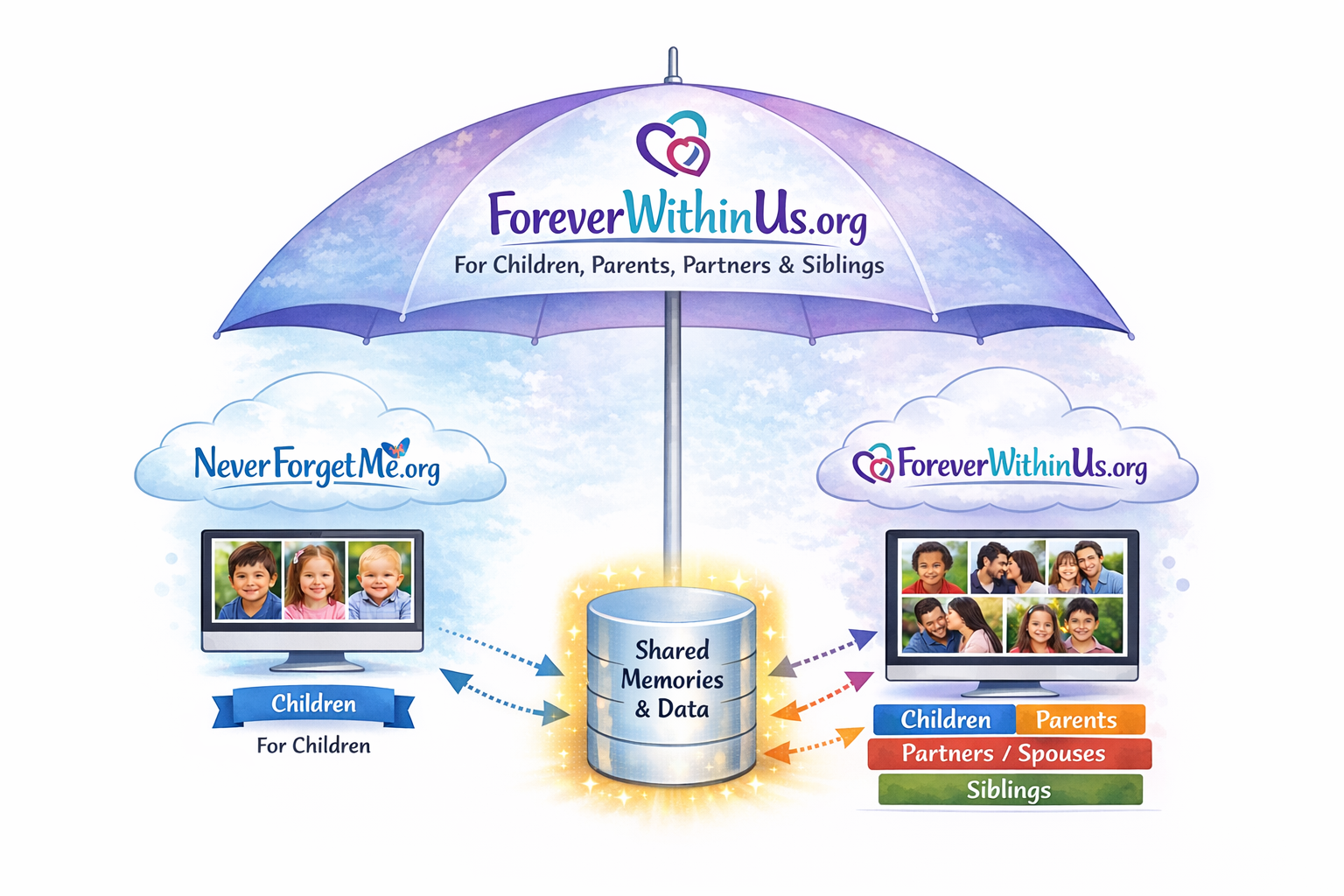
After spending several years talking to people about loss, children or otherwise, I realized that many are looking for the same thing as I am. I then created Forever Within Us as extension - to offer the same forever-home to anyone that has lost that special someone - a child, parent, paretner/spouse, or sibling.
Don't worry. Never Forget Me @ www.NeverForgetMe.org isn't going anywhere. In fact, for children that have passed away, both sites share the same data. I created Never Forget Me @ www.NeverForgetMe.org to honor my son Calvin who passed away in 2023. I know how I feel, and I knew other parents felt the same way. That site holds a special place in my heart. Never Forget Me, for parents who have lost a child, will have more services offered that cater to that type of loss. Some of those services, even though the same data is shared, won't be available on Forever Within Us. However, as I have mentioned, there are others that have lost someone, but not a child, who also want a forever-home for their loved one. Never Forget Me @ www.NeverForgetMe.org does not accommodate for those losses.
It would be an honor for me to share your loved one's memories. All of this is completely free.
Starting January 1, 2026, there will be two ways to create a forever-home for your loved one.
Prior to 2026, I performed all of the activities. There are certain groups of people that are very comfortable with technology and would like to add and maintain their loved one's tribute themselves, and then there are others that are not as comfortable with technology and would like my assistance. It can also be a cooperative effort. Any of these are perfectly ok, and you can change your mind at any time. I'm always willing to add and make modifications. I have purchased tools for photo optimization, etc. that may be beneficial. If you need me to adjust something, let me know.
First Option (I add/create your loved one's tribute)
For the first option, where I create/add your loved one's tribute, here is what I need:
Send all correspondence to: Support@NeverForgetMe.org
Second Option (You add/create your loved one's tribute)
For the second option, where you do the work, it's basically a three-step process, but hopefully not too complicated and time consuming. At a high level, here are the steps you need to perform:
Step 1 - Register on Forever Within Us (See below for how to register)
Step 2 - Validate your e-mail address (See below for how to validate your e-mail address)
Step 3 - Create/Add your loved one (Return to the FAQ page (this page) after logging in to see Tribute Modification steps/instructions).
While there is no requirement to have an account on Forever Within Us, there are several reasons why you may want to consider having one.
Starting January 1, 2026, your e-mail address must now be validated/confirmed before your account it becomes active.
Steps in registering/creating an account (For visual steps, scroll to the bottom):
Until you validate your e-mail address, you will be unable to log into your account.
To activate your newly registered/created account, you should receive a confirmation e-mail to the e-mail address you supplied when you submitted the form. That e-mail contains link in it. There are two ways to activate/validate your account/email:
The validation code only lasts 30 minutes. If you need to generate and send you a new code, perform the manual step above and click the "Generate New Code" link.
Please feel free to contact me at support@NeverForgetMe.org if you are having problems validating your e-mail/account.
(For visual steps, scroll to the bottom)
Once you've successfully registered with Forever Within Us (See above topic) you will be able to log in. Logging in lasts for 1 hour before you have to re-log in. Logging in provides the following benefits/features:
To log in, simply click the account icon on the upper right-hand side of any page, supply your e-mail address and password, and submit.
(For visual steps, scroll to the bottom)
Accounts, tributes and site access are completely free
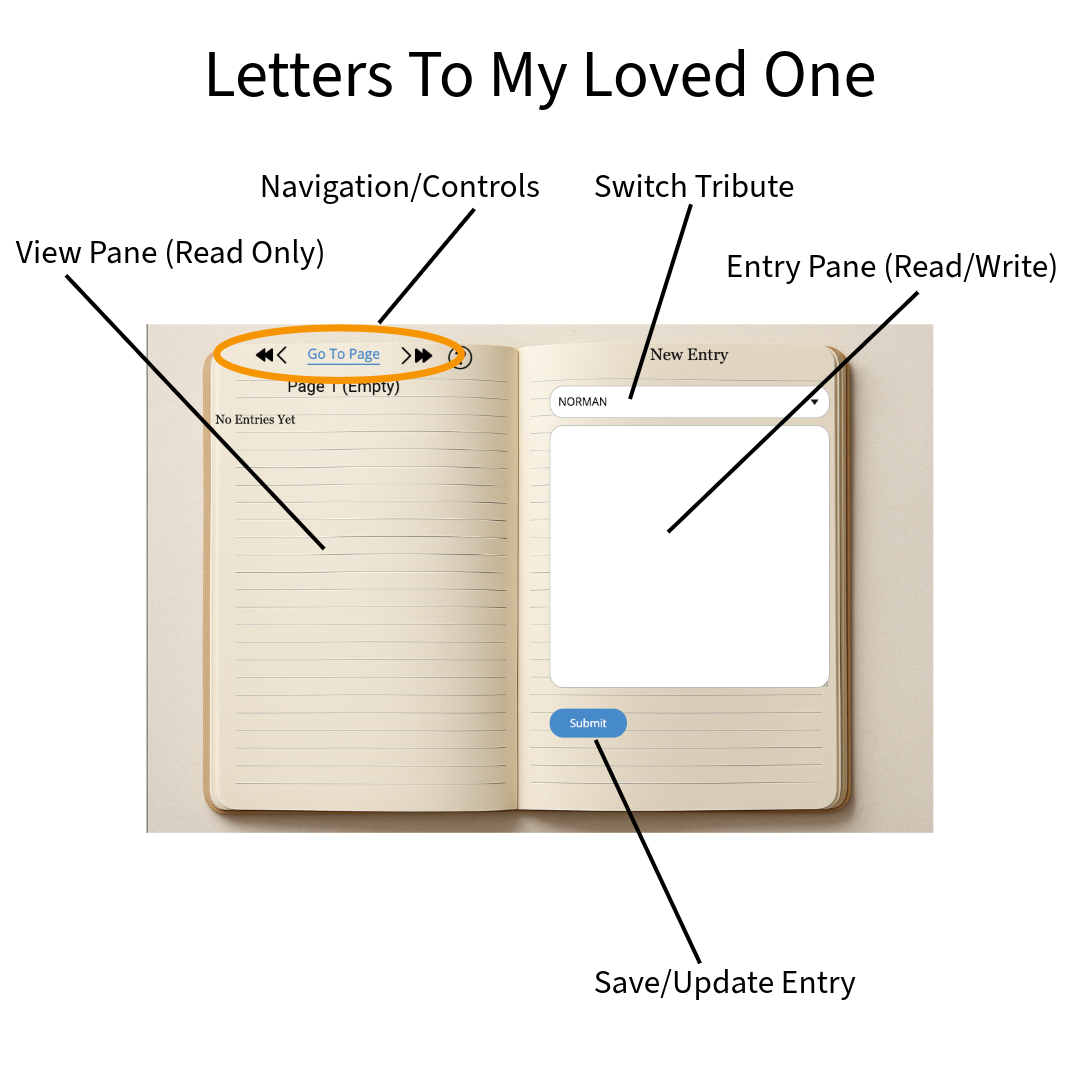
If you register with Forever Within Us, as a account-holder you will get access to Loved One's Letters - an on-line, private diary where you can express your thoughts to your lost loved one(s).
It is recommended to use a computer screen (v.s. a small mobile device such as a phone) for the best experience.
Panes/Sides:
There are two visible panes - a view pane and an entry pane. On a computer monitor, as the screen is much larger, the view pane is on the left side, and an entry pane is on the right side - like a book. On a mobile device, as the screen is much smaller, the two panes are stacked vertically. The view pane is on top and the entry pane is on the bottom.
View Pane:
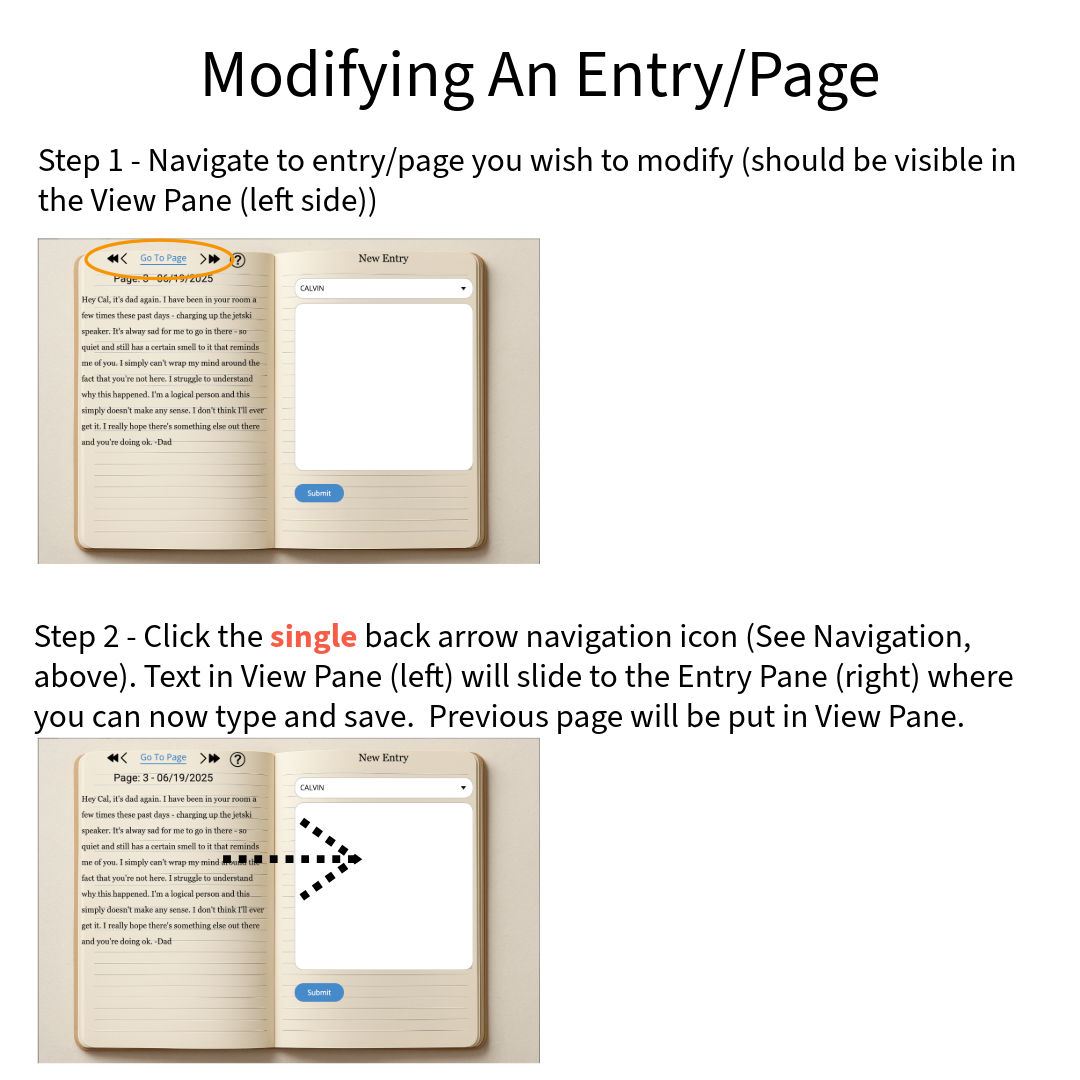
The view pane is a read-only pane that displays a specific page/entry. When you navigate, the page you're navigating TO is placed in the view pane (e.g. back one page/entry, go to page/entry 5, etc.).
Entry Pane:
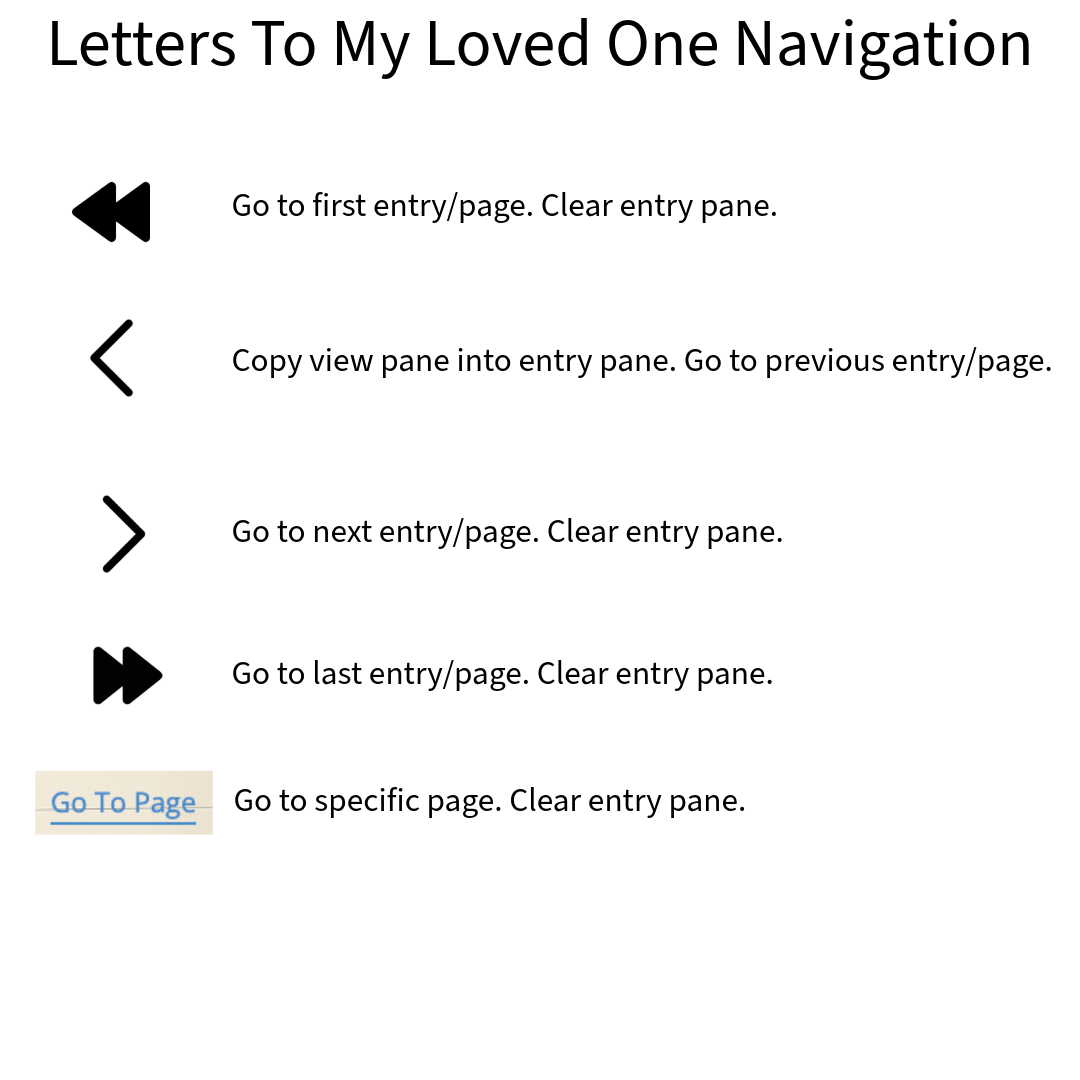
The entry pane is for either creating a new or updating an existing entry/page. Initially the entry page is empty allowing you to enter text for a new page. Any navigation, except "back one page" (see below), will ensure the entry page is empty so you can create a new entry/page (append a new page to the end of all pages). If you click the "back one page" navigation icon, it will slide the current View pane entry/page into the entry pane, and put the previous entry/page in the view pane - allowing you to modify the entry that was previously in the view pane (See below).
Each entry can have a maximum of 4000 characters. As such, the view pane is scrollable.
Prior to January 1, 2026, I was the only one that could create and modify tribute details. If you wanted to be "linked" to the tribute (unlocking certain benefits), I would provide you with a unique "link code" that you would use during the registration process. This option is always available.
Starting January 1, 2026, if you register with Forever Within Us, one of the benefits you'll receive is the ability to create or modify your loved one's tribute page, that way you can be more involved with the process if you'd like. You can change the personal information, their Forever Memory Board text, their dedicated tribute text, their images, audio, and the video URL.
The below steps are explaining how you would perform the activities. The process can be a cooperative effort.
Creating a new tribute:
Follow the below steps to create a new tribute page yourself:
That's a maximum of 20 uploads.
Linking to an existing tribute:
Some of the benefits of registering is you get to link your account with your love one's tribute - giving you access to the on-line diary and optional tribute modification abilities.
When I add your loved one to Forever Within Us
If I added your loved one to Forever Within Us, you will receive an e-mail from me with the tribute's unique link code. Once you have that link, follow these steps to link your account with your child's tribute.
When you add your loved one to Forever Within Us
If you added your loved one to Forever Within Us (You created the tribute yourself), you are automatically linked to your loved one. However, if another parent, for example, would like to register and be linked with your love one, you will need to supply the tribute link code to the other party (e.g. sharing a tribute with another person). To do that, follow these instructions:
Modifying an existing tribute
If you have waited more than 24 hours and your change has not been processed, reach out to support@NeverForgetMe.org.
Keep in mind that It's perfectly OK if you'd rather I make modifications for you. I'll be happy to do so.
When your tribute receives a dedicated tribute page, they also receive a dedicated message board, where anyone can leave a message letting you know they're thinking of you and your lost loved one. In the past, I have manually been moderating the messages, ensuring no spam occurs (I have yet to see this, but to be safe, I still moderate). If you register, you can log and moderate your own messages (I will still be reviewing things in case you don't log in frequently). To manage your message board:
To receive a discounted price on merchandise, simply log into Never Forget Me and visit the store. The system automatically offers price discounts once logged in.